Key takeaways
- A company operating system is the connected set of data structures, documented processes, and automations that runs a business’s repeatable work without depending on any single person’s memory.
- Frameworks like EOS and Scaling Up decide what the business should do; a built operating system is the software layer that does it. Most companies searching for one need both halves, and page-one advice covers only the first.
- A working build has four layers, in order: data foundation, processes, visibility, automation. Each layer runs on the one below it.
- A real example with numbers: Nomads Cast ran on seven separate tools; consolidated into one system, client onboarding went from hours of manual steps to under a minute, with zero human steps left.
- You need one when basic operational questions take manual report-pulling to answer, when onboarding runs differently every time, or when decisions stall because the founder is unavailable.
A company operating system is the single, connected system that captures how your business actually works and runs it that way every time, whether you are there or not. It holds your data in one structure, your processes as documented procedures the system itself executes, and your reporting as something that compiles itself.
That is the short answer. The longer one has two halves, and most of what you will read on this topic only covers the first.
What is a company operating system?
A company operating system is the documented, systemized set of processes, tools, and data structures that lets a business operate predictably, without depending on any single person’s memory. The name borrows deliberately from computing: the operating system on your laptop runs reliably in the background so you can focus on the work, and a company operating system does the same for a business. (It has nothing to do with Windows or macOS; the term describes how a company runs, not what its computers run.)
The term gets used loosely, and the loose usage hides a real split. Some people mean a management framework: a method for setting vision, running meetings, and tracking scorecards. Some people mean a software platform they subscribe to. When I say company operating system, I mean something more specific: a custom-built system that connects your data, your processes, your reporting, and your automations into one coherent structure the business owns.
We call ours the Company Brain. It is the single source of truth for everything that happens in the business: client records, project status, team capacity, financial data, compliance documentation. One place to check, and the same answer no matter who asks. That is also the working test for whether you need an integration or a rethink: if two systems are both being edited, syncing them moves the disagreement around rather than settling it.
Is EOS a company operating system? What about Scaling Up?
Yes, in the framework sense of the term, and it is worth being precise about what that covers. EOS (the Entrepreneurial Operating System), Scaling Up, OKRs, and their relatives are management frameworks: they give a leadership team a shared vocabulary, a meeting cadence, scorecards, and an accountability structure. For the leadership layer of a business, that is genuinely useful, and if you are comparing those frameworks, I wrote a separate, honest comparison of EOS and its alternatives.
What a framework does not do is execute anything. The scorecard tells you follow-ups are slipping; it does not send them. The meeting surfaces that onboarding is inconsistent; it does not run the onboarding. Between the meetings sits all of the actual operational work, and that work is done either by people re-entering data across six tools, or by a built system.
| Framework (EOS, Scaling Up) | Built operating system | |
|---|---|---|
| What it is | A management method: vision, meetings, scorecards, accountability | Software: data structure, interfaces, automations |
| What it answers | What should we focus on, and who owns it | The record is updated, the hand-off fired, the document routed |
| Runs on | Discipline and cadence | Airtable, Softr, Make, n8n, or custom code |
| Where it lives | In the leadership team’s habits | In infrastructure the business owns |
| Fails when | People stop keeping the discipline | The build was skipped and tools stayed disconnected |
| Typical seller | Licensed implementers and coaches | Subscription platforms, or a builder |
The two halves are complements, not rivals. A framework with no execution layer produces well-run meetings about problems nobody has capacity to fix. An execution layer with no framework automates work nobody has prioritized. Most of what ranks for this topic is written by framework implementers or by subscription platforms, so the built half is the half you will not read much about. I build that half, on a fixed scope the client owns outright, which is the vantage point this post is written from.
What are the four layers of a company operating system?
A real build has four layers, and they go in order. Skip a layer and the one above it will not hold.
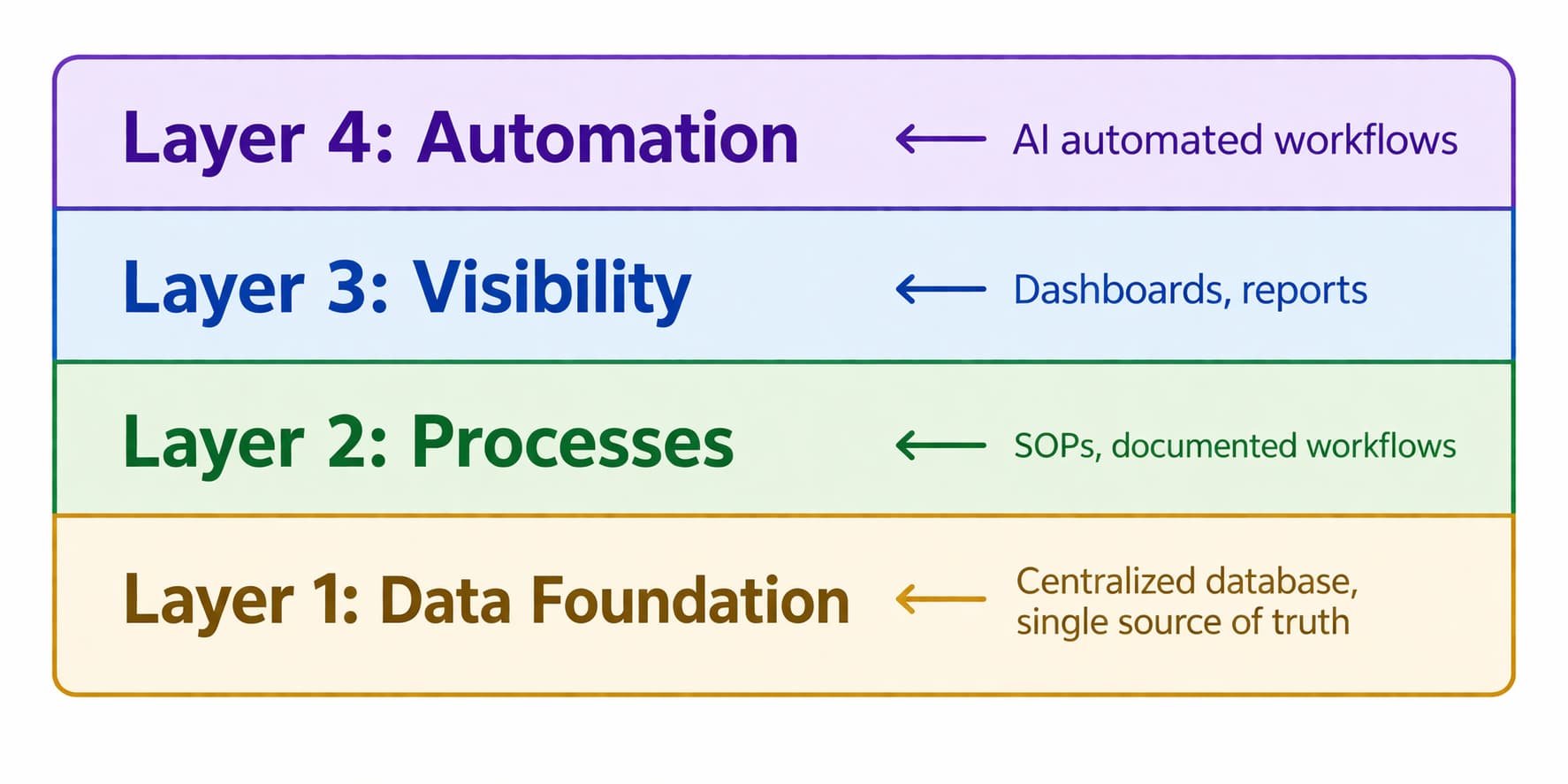
Data layer. The foundation. Before anything can be automated, the information needs to live in one place, organized consistently: clients, projects, team members, tasks, and finances in one connected structure, not duplicated across tools under three different naming conventions. Most businesses discover during this phase that the same client is recorded three different ways in three different systems. That is the problem to fix before everything else.
Process layer. Once the data has a home, every repeatable operation gets documented and systemized: client onboarding, project kickoffs, invoicing cycles, status updates. The system runs them in the same order every time, and the single source of truth stops being just a database and becomes the set of operating procedures the whole team follows.
Visibility layer. With clean data and documented processes, you can finally see the business in real time. Dashboards that need no manual compilation, reports that send themselves, capacity tracking that warns before a problem instead of after. This is the layer where founders stop needing to be everywhere to know what is going on.
Automation layer. The final layer removes the manual hand-offs. A client signs, so a project record is created, the team is notified, the onboarding sequence starts, and the first invoice is scheduled, with nobody remembering the next step because the system holds it. For Affinity Care, a home care agency we work with, this layer turned hours of weekly compliance documentation into records that maintain themselves.
What does a company operating system look like in practice?
The clearest example I can give is Nomads Cast, a content agency that ran on seven separate tools. Client records, projects, invoicing, communication, and documents each lived somewhere different, none of them connected, and when a key team member left, half the company’s operational knowledge left too. We consolidated the operation into one system and automated the sequence end to end: intake feeds the client record, the record creates the project, the project schedules the kickoff. Their eight-step manual onboarding, which used to take hours per client, now finishes in under a minute with zero human steps in it.
Scenthound, a dog-care franchise, is the same idea applied to a different bottleneck. Client follow-up was manual, inconsistent, and distributed across whoever had time that day. Built into the operating system as automated sequences on real triggers, the follow-up work that consumed over 40 hours a week of staff time, a full-time equivalent, now runs on its own.
And Affinity Care ran home care operations across five disconnected systems, with staff re-entering the same records daily and a compliance team spending the week before every audit reconciling documents. One Airtable system replaced all five; caregiver onboarding went from 21 days to 8, and the operation is audit-ready every day instead of the week after a scramble.
Three businesses, three different pressure points, one pattern: the operating system is not a philosophy they adopted. It is a thing that got built.
Who needs a company operating system?
Service businesses need one once coordination starts costing real hours, and the signals are specific. You cannot answer basic operational questions, utilization, revenue by client, project status, without manually pulling reports. Onboarding runs differently every time because the process lives in someone’s head. Decisions stall when the founder is unavailable. Headcount is being added specifically to do coordination work a system should be doing.
The businesses that feel it most acutely are in compliance-heavy industries: home care agencies, law firms, financial services, real estate operations. There, operational chaos is not just an inconvenience but a liability. When Affinity Care came to us, staffing decisions were being made from spreadsheets three days out of date, and that is exposure, not just inefficiency.
Every growing business crosses this line eventually. The choice is whether the operating system gets built deliberately or assembled by accident, one disconnected tool at a time.
How do you build a company operating system?
The build follows four phases, in order.
Discovery. Map what actually exists: every tool, every data source, every process, where information lives, who touches it, and where it gets lost. Discovery almost always surfaces problems the founder did not know existed, because things have been working only where one person quietly holds them together.
Documentation. Before anything is built, every core process gets documented as it actually runs, not as the org chart says it runs. This is the hardest phase, because most businesses have a real gap between the official process and the lived one, and the lived one, edge cases included, is what the system has to run.
Architecture. Design the new system: database structure, process flows, integration points, automation logic. This is where the tool choices happen, and the build is shaped to the business rather than the business reshaped to fit a generic tool.
Build and handoff. We build in Airtable, Softr, Make, and whatever else fits the case, then migrate the data, train the team, and document the system so the client owns it. The operations consulting process is designed to end with something you run without us, not a dependency you have to keep paying to maintain.
Frequently asked questions
Is a CRM a business operating system?
A CRM is one component, not the system. It holds the customer-facing slice: contacts, pipeline, and communication. A company operating system also has to hold projects, capacity, finances, and compliance, and connect them, which is why businesses that buy a CRM expecting an operating system end up with the CRM plus the same five disconnected tools around it.
Do I need EOS before building an operating system?
No, and the two solve different problems. A framework like EOS organizes the leadership layer: priorities, meetings, accountability. The built system executes the operational layer underneath it. Businesses adopt them in either order, and the ones that run best usually have both.
What software is a company operating system built on?
Ours are built on Airtable for the data foundation, Softr for the interfaces teams and clients log into, and Make or n8n for the automation layer, with custom code where the case needs it. The specific tools matter less than the order: data first, then process, then visibility, then automation.
What is an example of a company operating system?
At enterprise scale, the Toyota Production System and the Danaher Business System are the textbook cases. At service-business scale: Nomads Cast runs client intake through delivery on one built system, with an onboarding that finishes in under a minute and no manual steps, which is what the term looks like in practice for a company of ordinary size.
If you are not sure where you stand, the fastest way to find out is to book a call. We will look at your data layer, your processes, and your automation readiness, and give you a clear picture of what to build first.
Some businesses also ask about bringing in a fractional COO instead of a one-time build. The difference: a fractional COO is ongoing operational leadership; what we build here is a system you own and run yourself.