Key takeaways
- Business process automation (BPA) means software running recurring tasks without a human in the middle, onboarding, follow-up, notifications, payment reminders, reporting.
- Real examples at service-business scale: Nomads Cast cut an 8-step client onboarding from hours to under a minute with zero manual steps; Scenthound recovered over 40 hours a week of follow-up work; Affinity Care went from 21-day caregiver onboarding to 8.
- The 5 highest-ROI automations for service-based businesses, in order: client onboarding, lead follow-up and retention, internal notifications, invoice reminders, reporting.
- Tool choice: Make.com for complex multi-tool workflows, Zapier for simple cases, Airtable native automations for in-Airtable logic. Make is dramatically cheaper at volume.
- Build order matters. Automating a broken process just makes the broken process faster, fix the data and document the process before you connect it.
Business process automation is the work most of my clients hire me for, and most arrive with the same problem: they’ve tried to automate before, it didn’t stick, and now they’re not sure why. Usually the answer is simple. They automated the wrong things first, or they automated a broken process and just made the broken process faster.
Business process automation isn’t complicated in principle. You find the work that repeats on a predictable schedule, you remove the human from the middle of it, and you redirect that time toward work that actually requires judgment. What makes it hard in practice is the sequencing, knowing which processes to touch first, which tools to use, and what the thing needs to look like before a machine can run it reliably.
I’ve built 80+ automations across service businesses. This is the guide I give clients at the start of an engagement: what business process automation actually is, what it looks like in real businesses with real numbers, which five processes to automate first, what tools do what, and what build order produces results instead of half-finished workflows that nobody maintains.
What is business process automation?
Business process automation (BPA) is the use of software to execute recurring business tasks without human intervention. When a client signs a contract and a folder structure appears, a Slack message fires, and a welcome email goes out, without anyone on your team doing anything, that’s business process automation.
It’s distinct from regular software. Every SaaS tool you use involves some automation. BPA means deliberately designing workflows that connect your tools and trigger actions based on defined events, so that the operational layer of your business runs on rules rather than people.
The scope ranges from simple (a Zapier trigger that copies a new row from one sheet to another) to complex (a multi-branch Make.com scenario that handles client onboarding across seven tools without a single manual step). For service businesses, you almost never need the simple stuff, and you almost always need something closer to the complex end.
What are real examples of business process automation?
Most example lists name categories: employee onboarding, invoice processing, claims handling. The ones that name actual companies name enterprises, a Spanish telecom, a hospital network, an insurance plan. If you run a service business, neither tells you what business process automation looks like at your scale. These three do, and each number is from a delivered project.
| Business | What was automated | Before | After |
|---|---|---|---|
| Nomads Cast, content agency | 8-step client onboarding across Notion, Go High Level, Jotform, Google Drive, Gmail and Slack | Hours per client, every step manual | Under a minute, zero manual steps, 5 hours saved per client |
| Scenthound, dog-care franchise | Client follow-up: post-visit messages, 25-day re-engagement, membership win-back | Over 40 hours a week of staff time | Runs on triggers, a full-time equivalent recovered |
| Affinity Care, home care agency | Caregiver onboarding, compliance documentation, record entry across five systems | 21-day onboarding, audit-week scrambles | 8-day onboarding, audit-ready every day |
The pattern across all three: none of them started by buying an automation tool. Each started with the data being consolidated into one structure, then the process documented, then the automation built on top. That order is the second half of this guide.
Which processes should a small business automate first?
Business process automation pays back unevenly, and these five processes show up at almost every business I work with, and they’re ranked by time savings and downstream impact.
1. Client onboarding
Onboarding is the highest-leverage automation for most service businesses because it happens with every client and it’s almost always overly manual. The typical pre-automation version: send a questionnaire by email, wait for it back, build a folder, create an account somewhere, set up a Slack channel, update a tracker. Six to eight steps, all done by a person, for every new client.
Nomads Cast had exactly this process, eight manual steps per client, each touching a different tool. We replaced it with a Make.com automation connecting Notion, Go High Level, Jotform, Google Drive, Gmail, and Slack. Client enters the system, everything fires in sequence, zero human steps. Onboarding time dropped from hours to under a minute. The team recovered 5 hours per client, time that previously went to setup and coordination.
The agency version of this build, onboarding plus reporting end to end, is covered in the marketing agency automation guide, and the law-firm version, intake through deadline chains, in the legal workflow automation guide. Onboarding automation is worth doing first because the ROI compounds. Five hours saved per client means the 10th client saves you 50 hours compared to the manual alternative.
2. Lead follow-up and client retention
The second process is follow-up, the messages your team sends after a meeting, after a visit, when a client hasn’t been heard from in 30 days. Manual follow-up is inconsistent (it happens when someone remembers) and slow (it goes out the next day, not within the hour). Both problems cost you deals.
Scenthound’s team was manually managing all post-visit communication and lapsed-member re-engagement across a growing franchise. We rebuilt their CRM logic around client lifecycle states and automated every routine touchpoint, post-visit messages, 25-day re-engagement sequences, cancellation win-back flows. The result was 40 hours per week recovered from manual follow-up tasks and 80% faster response times. Mike Schoen, COO, described it as saving a full-time equivalent of manual work.
Workflow automation for lead follow-up is the difference between a CRM that stores data and a CRM that drives revenue from the data it already has.
3. Internal notifications and status updates
Someone finishes a deliverable and doesn’t tell the next person in line. A project moves to a new stage but the project tracker doesn’t reflect it. A client pays an invoice and the account manager doesn’t know for two days. These are small failures individually; they add up to a business where coordination happens via Slack messages and memory rather than systems.
Automating internal notifications means defining: when X happens in system A, notify person B and update system C. No manual handoffs. No one has to remember to tell the next person. Status is always current because the update is automated at the moment the trigger fires.
4. Invoice and payment reminders
Collections are one of the most predictable processes in any service business, and one of the last to get automated, because it feels awkward and founders put it off. Once it’s set up, a payment reminder sequence requires nothing from your team: a reminder goes out at 3 days, another at 7, another at 14. If payment clears, the sequence stops automatically.
The time savings are modest. The value is that the reminders keep going out on schedule, including in the weeks when nobody feels like sending them.
5. Reporting and data aggregation
Every business I’ve audited has reporting that either doesn’t happen or happens manually once a week when someone pulls data from three tools and builds a spreadsheet. Automated reporting means the numbers are always current, the dashboard always reflects reality, and nobody spends Friday afternoon doing data entry.
This one tends to get built last because it requires the first four to be working. You can’t automate reporting on a process that isn’t running cleanly yet.
Where to start
Which five automations would pay back fastest in your business?
The order matters more than the ambition. We map your workflows, rank the automation opportunities by recovered hours, and tell you what to build first.
Map your automation orderWhich tools are used for business process automation?
Business process automation at small-business scale runs on three tools worth knowing: Make.com, Zapier, and Airtable’s native automations. Here’s when each is the right choice.
Make.com is what I use for almost everything complex. It handles multi-step, multi-branch workflows well, the visual builder is intuitive once you understand the logic, and the pricing is dramatically more favorable than Zapier at volume. The Nomads Cast and Scenthound automations above were both built on it, and it is the right choice for anything involving more than two or three tools or any conditional logic. Our full breakdown of Make.com automation work covers this in more detail.
Zapier is more expensive at equivalent operation volume and handles complexity less gracefully, but it has better native integration with certain tools and a lower barrier to entry for non-technical users who want to set up simple workflows themselves. If your automation needs are simple and you want to manage them in-house, Zapier works. If you’re hiring someone to build a real automation stack, the economics almost always favor the former.
Airtable native automations are underused. If your data already lives in Airtable, you can automate a surprising amount without touching Make or Zapier, record-triggered emails, status updates, notifications, basic conditional logic. The limitation is scope, and it is sharper than most people expect: Airtable automations can create a row in an external tool but cannot update one that already exists. For anything that needs to span systems, or to keep them in agreement rather than just append to them, you’ll want Make on top of it.
For service businesses, the typical business process automation setup is Airtable as the data foundation with Make connecting it to everything else. That combination handles 90% of the use cases without requiring anything more sophisticated.
How much does business process automation cost?
Business process automation has two costs, tools and the build, and the tool half is predictable. Make.com starts at $9/month, scales to $16–$29/month for most small businesses. Zapier is $19.99–$49/month for comparable usage. Airtable runs $20–$45/user/month depending on tier. If you’re building simple automations yourself, monthly tool cost is $50–$150.
Build fees, what you pay a consultant to design and implement the automation, depend entirely on complexity. A 2-tool trigger-action and a multi-system onboarding workflow with conditional routing, error handling, and documentation are completely different scopes. Every business’s processes are different, so there’s no standard rate that applies across projects. If you want a number for your situation, book a call and we’ll scope it.
The ROI math usually closes fast regardless. Nomads Cast was saving 5 hours per client. If they onboard 20 clients a year at an average hourly cost of $40, that’s $4,000 in recovered labor from a single automation, compounding indefinitely. Scenthound recovered a full-time equivalent, 40 hours per week, every week.
The automation and workflow integration page covers what a full engagement looks like and what you should expect at each complexity tier.
What is the right order to automate business processes?
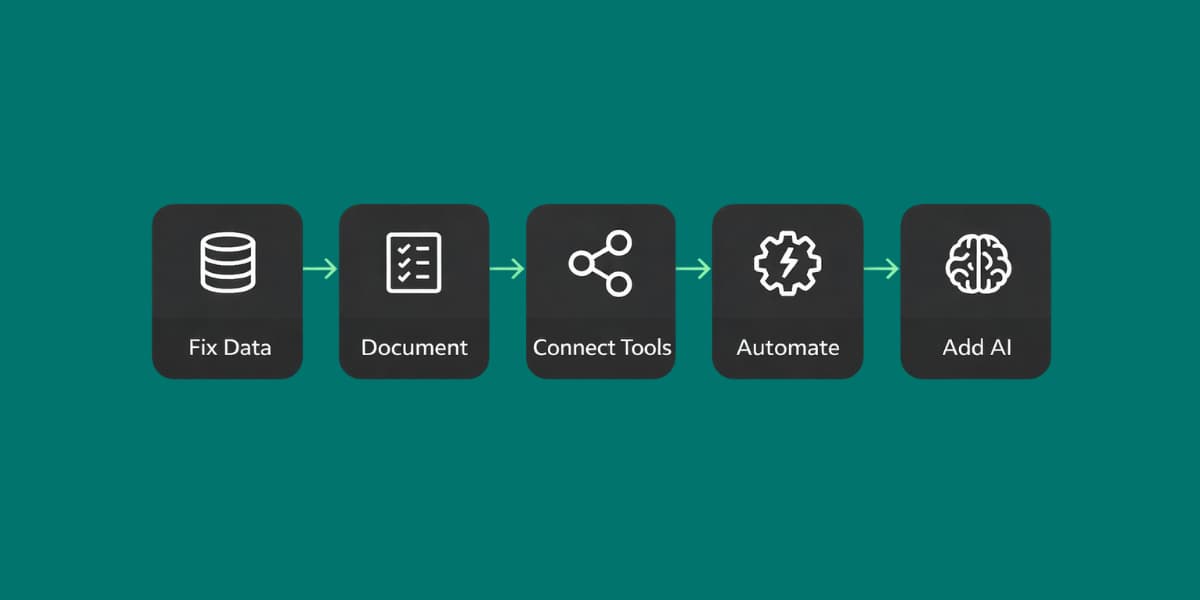
Business process automation succeeds or fails on sequence, and I’ve seen businesses skip it and regret it.
Step 1: Fix the data first. Automations run on data. If your data is incomplete, in the wrong format, or spread across five places, your automations will fail silently or produce wrong outputs. Before you automate anything, get your data architecture right, one source of truth, clean records, fields that mean the same thing every time. This is the operations consulting work that has to happen before the automation work; what happens in an operations audit covers the exercise step by step.
Step 2: Document the process before you automate it. A machine will do exactly what you tell it, including executing a broken process at scale. Map the workflow first: every step, every decision point, every tool involved. Then look for what doesn’t need to be there. Automate the simplified version, not the current one.
Step 3: Start with high-frequency, low-complexity processes. Client onboarding and follow-up sequences run constantly and have predictable inputs. They’re the right place to start. Don’t begin with the most complex automation in your business, begin with the one that runs the most often, produces the most savings, and has the cleanest inputs.
Step 4: Connect your tools before adding logic. Business process automation is plumbing before it is logic: get the platform talking to your CRM, your email, your project management tool. Verify data is flowing correctly. Then layer in the conditional logic and multi-branch sequences. Building complexity before the connections are stable means debugging two problems at once.
Step 5: Layer AI last. AI-powered automation, document processing, intelligent routing, voice agents, only works well on top of clean data and tested workflows. If you try to add AI before the foundation is solid, it amplifies the problems in your data rather than solving them. If you’re not sure your foundation is ready for this layer, that’s where our AI implementation work begins.
Run all five steps and what you end up with is a business operating system: one connected layer the whole company works from, instead of automations bolted onto a mess.
Common mistakes that kill automation projects
Business process automation projects die in the same five ways.
Automating a broken process. The most common one. If your onboarding process has six unnecessary steps and two approval gates that add no value, automating it makes those steps happen faster, not better. Simplify first.
Starting with the wrong automation. Every business has one automation they think is most important and three that would actually save more time. The “most important” one is usually the most complex and the hardest to get right. Build confidence with the high-frequency, high-ROI processes first. The complex ones are easier after you understand how the system behaves.
Not documenting the logic. Automations built without documentation are a liability. When something breaks six months later, and something always breaks, the person who fixes it needs to understand the logic, not just the steps. Document every scenario, every conditional branch, every error state.
Choosing the wrong tool for the job. Using Zapier for something that needs Make.com is like using a spreadsheet for a database problem, it works until it doesn’t, and then it fails expensively. Know your tools before you build.
Building automations that nobody understands. If your team doesn’t understand how the automation works, they won’t trust it and they’ll work around it. Build with your team, not for them. Train them on the logic, not just the interface.
Business process automation done right is infrastructure, it runs in the background, reliably, without anyone managing it. Done wrong, it’s a collection of half-maintained workflows that creates more problems than it solves.
If you’re not sure where to start or which processes in your business are worth automating first, book a call. We’ll map your current workflows, identify the 5–10 highest-ROI automation opportunities, and tell you what order to build them in, before you commit to anything.